Tool review Tested hands-on
Higgsfield review: I animated two photos with Seedance 2.5
Higgsfield runs several AI video models in one place. I turned two test photos into five-second clips with Seedance 2.5. Here is what held, and what drifted.
Short answer
I tested Higgsfield on 15 November 2026. Its Seedance 2.5 model turned my 4:3 photo of a border terrier, an AI-generated still I made, into a 5-second, 720p clip for 35 credits. The markings, coat colour and red collar held throughout, but the clip came back in 16:9, so the opening shot was re-framed. A free account’s 10 sign-up credits do not cover one such clip; a 4-second Seedance 2.0 Mini clip cost 4 credits.
Price and plans
Free plan with 10 one-off credits at sign-up. Paid plans are credit-based; the cost of a clip depends on the model and settings and is shown before you generate. See the current plans on Higgsfield.
The dog stayed the same dog. The frame did not stay the same frame.
Source photo, then the clip
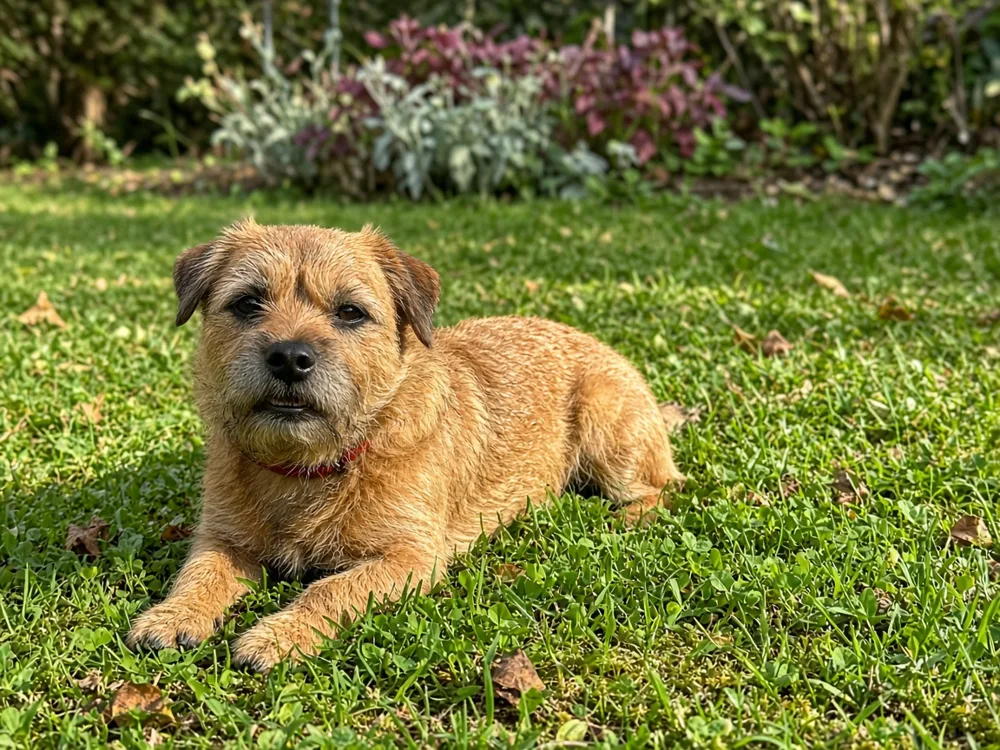
Both source photos above and below (the terrier and the portrait) are AI-generated images I made for testing. They are not photos of real people or pets. The labrador further down is a real photograph, credited under it.
More examples from my tests
A portrait: blink, breath and a slow push-in
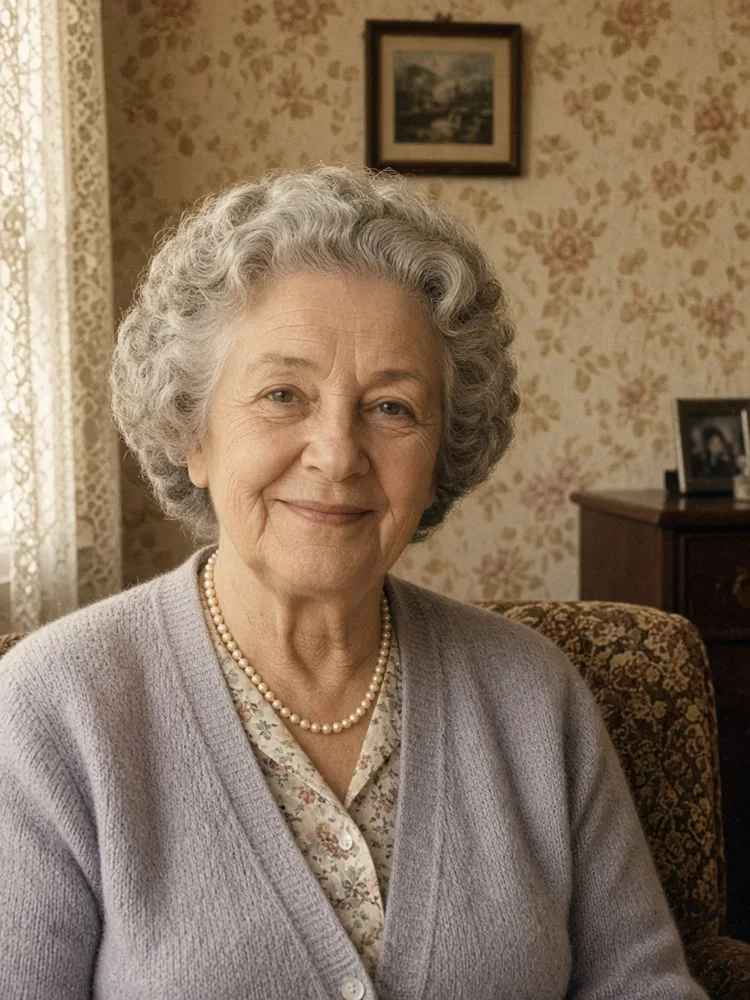
Prompt: “Animate this portrait: the person blinks naturally, breathes gently and gives a small soft smile, with a very slow camera push-in. Keep their face, features and age exactly the same as the photo. No new people or objects.” The blink, the breathing and the soft smile look natural, and the push-in worked. The wallpaper, picture frame, pearls and cardigan stayed stable with no warping. By the end of the push-in the face reads very slightly different from the photo, a touch smoother and rounder. It is close, but someone who knew her might notice.
An earlier test on a cheaper model: a real labrador
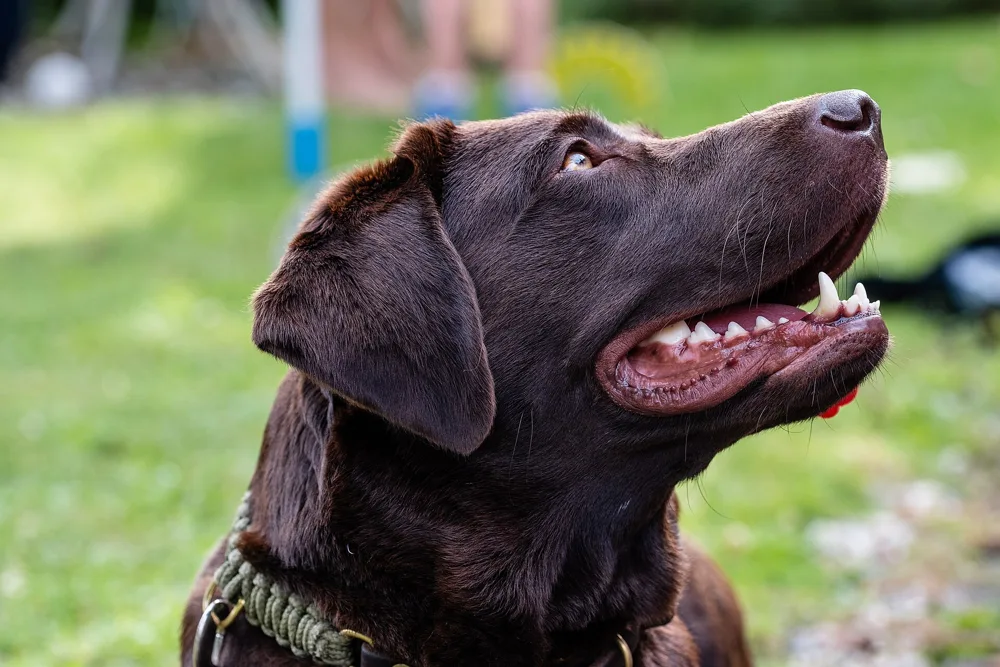

The motion is good and clean. Once the head turns, though, the model had to invent the side of the face it could not see, because the dog is in profile in the photo. The small red tag under the chin disappears.
The prompt I used, and what came back
Animate this pet: it lifts its head, looks around curiously and breathes naturally, with a gentle ear movement. Keep its markings, collar and the background exactly the same. Smooth, realistic motion.
Seedance 2.5 inside Higgsfield, image-to-video, 5 seconds, 720p, no audio. Made on 15 November 2026, during a free trial of one of Higgsfield’s paid plans. The markings and collar held all the way through; the widescreen output re-framed my 4:3 photo at the start, and the ear movement I asked for is subtle.
What is Higgsfield good at?
- One account, several video models. Higgsfield’s own model guide lists Seedance, Kling, Wan, Veo and Minimax Hailuo, among others.
- There is a free plan: new accounts get 10 one-off credits at sign-up, according to Higgsfield’s site.
- In my pet test the dog’s markings, coat colour and red collar held for the whole clip.
- In my portrait test the blink, breathing and slow push-in looked natural, and the wallpaper, pearls and cardigan stayed put without warping.
- The cost check shows the credit price before you generate, so you can try a cheaper model first.
- My test clips, made during a trial of a paid plan, downloaded without a visible watermark.
Where does Higgsfield fall short?
- Ten sign-up credits go quickly: they covered my cheap 4-credit test, but not one 35-credit Seedance 2.5 clip.
- Higgsfield says output on the free plan can carry a visible watermark.
- My pet clip came back in 16:9 from a 4:3 photo, so it opens on a re-composed, closer shot rather than my original framing.
- By the end of the portrait push-in the face read very slightly different from the photo: close, but not exact.
- Credit cost varies a lot by model. My account showed 35 credits for five seconds of Seedance 2.5 and 4 credits for four seconds of Seedance 2.0 Mini.
- My Seedance 2.5 jobs took tens of minutes to start at a busy time on a Sunday.
- I haven’t quoted plan prices here; read the plan and its renewal terms in your account before you pay.
Higgsfield is a web app that puts several AI video models behind one login. Its home page, checked on 15 November 2026, leads with Seedance 2.5 and talks about more than 35 models, and its own model guide lists Seedance, Kling, Wan, Veo and Minimax Hailuo for video. The model list in my own account showed Seedance 2.5, Seedance 2.0 Mini, Kling 2.6, Kling 3.0 Turbo, Wan 2.7, Minimax Hailuo and Grok Video, among others. You upload a photo, pick a model, describe the motion and spend credits.
I tested it the way this site tests everything: one photo, one plain prompt, and a frame-by-frame look at what came back. It is now my main pick for animating a single photo, because it is the one I have actually run. I have not run the same photos through Runway, Luma or CapCut, so this is not a head-to-head.
How I made these
Everything on this page was made on 15 November 2026. The two Seedance 2.5 clips were made during a free trial of one of Higgsfield’s paid plans, which covered their credits. The cheaper labrador test further down used the free sign-up credits.
- Model: Seedance 2.5 inside Higgsfield, image-to-video
- Length and size: 5 seconds, 720p
- Sound: none
- Source photos: two AI-generated stills I made for testing, a border terrier in a garden and an elderly woman in a 1970s-style colour photo
The pet prompt:
Animate this pet: it lifts its head, looks around curiously and breathes naturally, with a gentle ear movement. Keep its markings, collar and the background exactly the same. Smooth, realistic motion.
The portrait prompt:
Animate this portrait: the person blinks naturally, breathes gently and gives a small soft smile, with a very slow camera push-in. Keep their face, features and age exactly the same as the photo. No new people or objects.
Both prompts say what should move and, just as firmly, what must stay the same. That second half is the part that saves a take.
What held, and what didn’t
The terrier. The dog stayed the same dog. Its markings, coat colour and red collar held for the whole 5 seconds. The head lifts and turns, the breathing looks natural, and the garden behind stays consistent. The ear movement I asked for is there but subtle.
The catch was the frame. My photo is 4:3, and the clip came back in 16:9 widescreen. To fill the wider frame the model re-composed the shot: the opening frames are a closer view with the head lowered, so the clip doesn’t start on my original composition. If you need the clip to open on your exact photo, crop it to 16:9 yourself first, or check the aspect ratio setting before you generate.
The portrait. This is the harder test, because people notice a face. The blink is natural, the breathing is gentle and the small smile is soft rather than a grin. The slow push-in worked. The wallpaper, the picture frame, the pearls and the cardigan all stayed stable, with no warping at the edges. It kept the 3:4 portrait shape.
By the end of the push-in, though, the face reads very slightly different from the photo. It is a touch smoother and rounder. It is close, and a stranger wouldn’t notice, but someone who knew the person might notice. For a social post that is fine. For a memorial it is the thing to check before anyone else sees it.
An earlier test on a cheaper model
Before the Seedance 2.5 clips I tried Seedance 2.0 Mini, a much cheaper model in the same account, at 720p for 4 seconds, paid for with the free sign-up credits. One test used a real photograph of a labrador from Wikimedia Commons (credited above). The motion was good and clean. But the dog is in profile in the photo, so once the head turned the model had to invent the side of the face it couldn’t see, and a small red tag under the chin disappeared.
In the same session I tried an old black-and-white portrait of a man on the Mini model. It drifted enough that he looked like a close relative rather than himself. I haven’t shown that one. It is the clearest reason I would not hand a cheap, fast take of a late relative to a family without checking it first.
How many credits does a Higgsfield clip cost?
Higgsfield has a free plan. Its site says new accounts get 10 free credits once, at sign-up, and that the cost of a video depends on the model and settings and is shown before you generate. Here is what my account showed on 15 November 2026:
| What | What my account showed |
|---|---|
| Credits on sign-up | 10 |
| Seedance 2.5, 720p, 5 seconds | 35 credits |
| Seedance 2.0 Mini, 720p, 4 seconds | 4 credits |
So the sums are simple. The 10 sign-up credits paid for my earlier, cheaper Seedance 2.0 Mini test, the labrador. They would not cover a single 35-credit Seedance 2.5 clip. The pet and portrait clips were made during a free trial of one of Higgsfield’s paid plans, which covered them. If you start a trial, check what you will be charged when it ends, and cancel in time if you don’t want to keep the plan.
The gap between models is the useful part. Draft your prompt on a cheaper model, then spend the bigger credits on the take you mean to keep.
I haven’t quoted plan prices. See the current plans on Higgsfield, in your own currency, before you pay.
On timing: through the queue during the trial, my Seedance 2.5 jobs took a long time to start, tens of minutes at a busy time on a Sunday. The Seedance 2.0 Mini jobs finished in about 2 minutes. That is my experience on one day, not a guarantee either way.
There is no visible watermark in my downloaded clips, which were made under the paid-plan trial. Higgsfield’s own pricing guide says output on the free plan can carry a visible Higgsfield watermark, and lists none on the paid tiers. Check before you publish.
Who should use Higgsfield?
Pick Higgsfield if you have one good photo and want a few seconds of believable motion: a pet that lifts its head, a portrait that breathes, a product that turns in the light. It suits people who want to try more than one model without opening more than one account, and who will read the credit cost before pressing generate.
Skip it as the main tool for a tribute made of 30 photographs. That is an editing job: use CapCut or another editor, and drop in a Higgsfield clip as a short opening only if the face passes your check. The method is in how to make a memorial tribute video.
Tips from my tests
- Crop first. Upload the photo at the shape you want the clip to be. My 4:3 photo became a re-framed 16:9 clip.
- Say what stays the same. “Keep its markings, collar and the background exactly the same” did its job.
- Watch the last second. Drift builds up. My portrait looked right at the start and only slightly off at the end of the push-in.
- Draft cheap. Try the prompt on a low-cost model before spending 35 credits on one take.
- Expect to wait at busy times. Leave the tab open and do something else.
About the affiliate link
This page contains affiliate links to Higgsfield. Every Try Higgsfield button is a paid link, and Higgsfield is marked Ad where it first appears on the page. If you sign up through one, Higgsfield pays me a commission. You pay the same. It didn’t change what I wrote about the 16:9 re-framing or the face drift. You can also go to higgsfield.ai directly.
Sources
Checked 15 November 2026:
- Higgsfield home page
- Higgsfield AI video page and FAQ (free plan and sign-up credits)
- Higgsfield pricing explained (watermarks by plan)
- Which AI model should I use? (Higgsfield’s model guide)
- The model list, cost checks and credit balance in my own Higgsfield account
- “Portrait of a labrador retriever” by Dktue, CC0, Wikimedia Commons
Questions people ask
Is Higgsfield free?
Yes, there is a free plan. Higgsfield’s site says new accounts get 10 free credits once, at sign-up, and that the cost of a video is shown before you generate (checked 15 November 2026). Ten credits covered my 4-credit test on Seedance 2.0 Mini, but not a 35-credit Seedance 2.5 clip. Higgsfield also says free-plan output can carry a visible watermark.
How did you make the Seedance 2.5 clips?
During a free trial of one of Higgsfield’s paid plans, which covered the credits for the pet and portrait clips. If you start a trial, check what you will be charged when it ends, and cancel in time if you don’t want to keep the plan.
Which model did you use, and what did it cost?
Seedance 2.5, image-to-video, 5 seconds at 720p with no audio. Higgsfield’s own cost check in my account showed 35 credits for that clip on 15 November 2026. An earlier test on Seedance 2.0 Mini, 4 seconds at 720p, showed 4 credits.
How long does a clip take to make?
In my experience it varied. The Seedance 2.5 jobs took tens of minutes to start through the queue at a busy time on a Sunday. The earlier Seedance 2.0 Mini jobs finished in about 2 minutes. That is what happened to me, not a promise.
Will it keep the shape of my photo?
Not always. My 4:3 pet photo came back as a 16:9 clip, so the model re-composed the opening frames. My 3:4 portrait stayed 3:4. Crop the photo to the shape you want before you upload it, and check the aspect ratio setting before you generate.
Should I use it to animate a photo of someone who has died?
Carefully, if at all. In my portrait test the face read very slightly different by the end of a slow push-in, and an earlier black-and-white portrait test on a cheaper model drifted enough that the man looked like a close relative rather than himself. For a memorial, keep the real photograph still and only use a short clip if the family agrees the face is right.