Plans and limits Photo prep tool, not a video maker
ArtSpace: restore, colourise and upscale a photo before it moves
ArtSpace is a browser image tool with one-click photo restoration, colourising and upscaling, sold as a one-off purchase from $59 or monthly from $9, plus applicable tax. I own the lifetime deal.
Short answer
ArtSpace is a browser image tool. ArtSpace advertises 311+ one-click tools, including Restore Old Photo, Colorize B&W, Sharpen and upscaling, plus text-to-image; Pro and Unlimited list export up to 4096 × 4096 pixels. It doesn’t make video: use it to get a photo ready before you animate or edit it. On 18 November 2026 the one-off lifetime deal started at $59 for 300 images a month, and monthly plans at $9, plus applicable tax at checkout. “Lifetime” means for as long as ArtSpace runs. I own the lifetime deal.
Price and plans
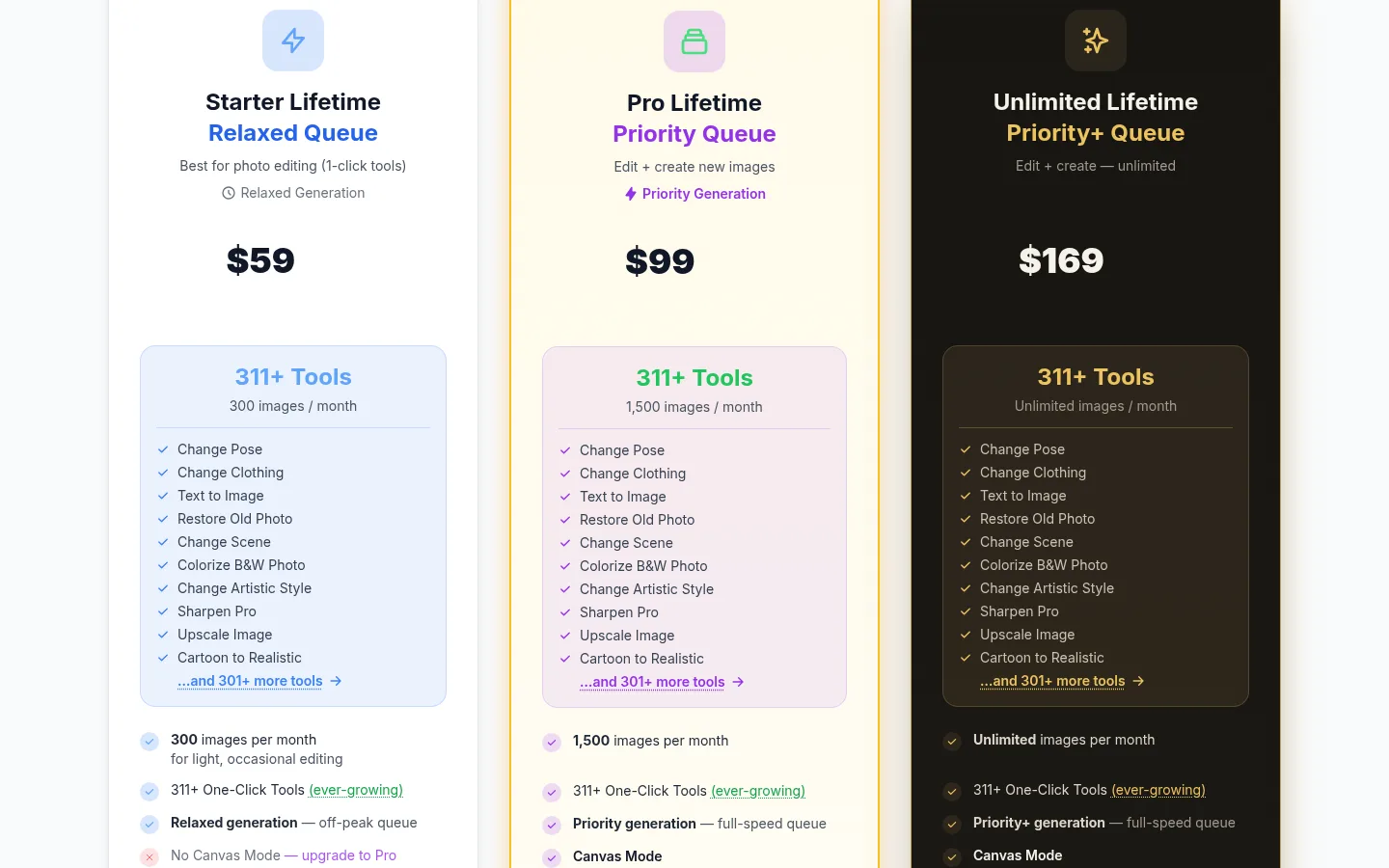
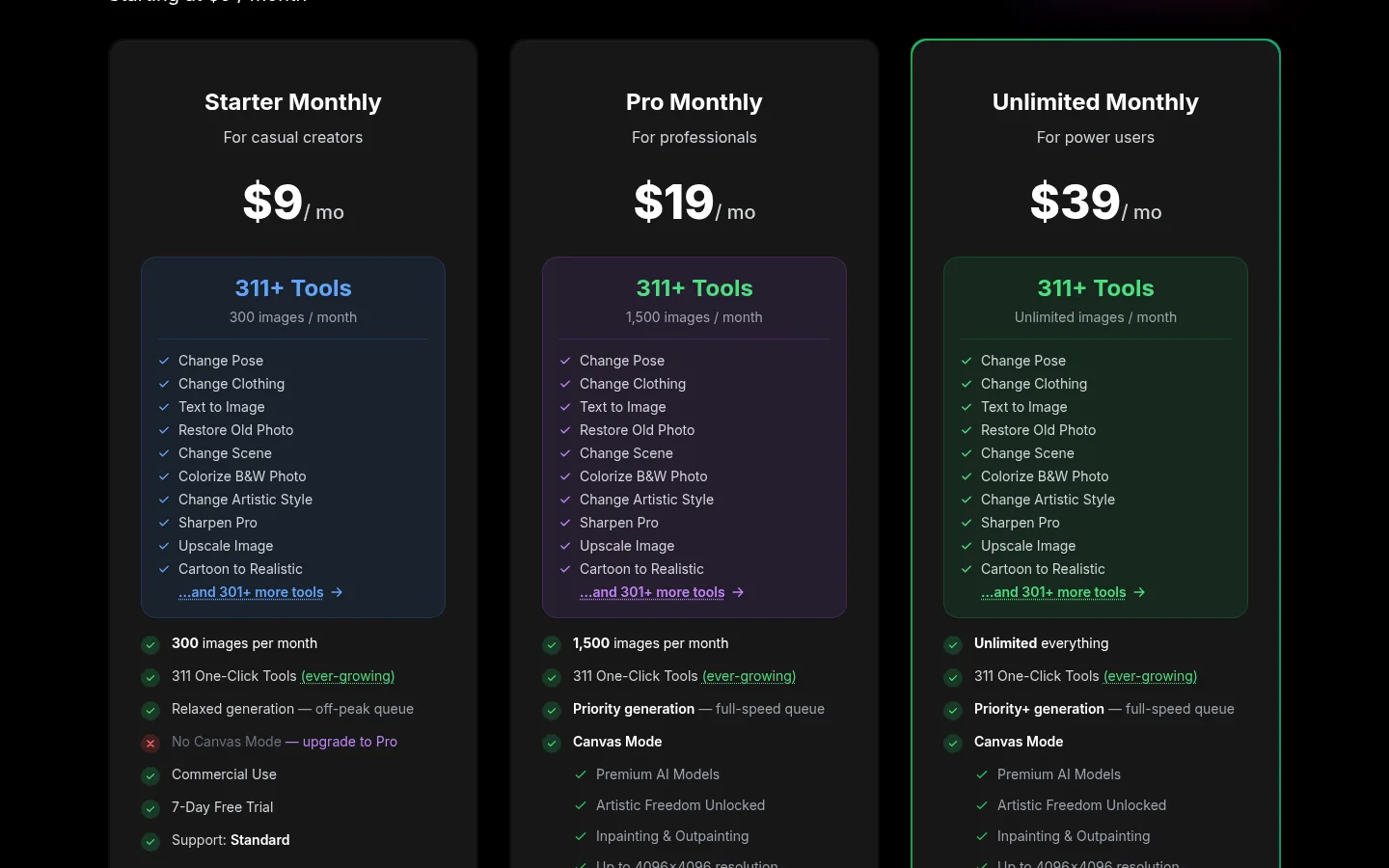
No free plan. Lifetime deal, one payment, where lifetime means access for as long as ArtSpace operates: Starter $59 or about £44 for 300 images a month, Pro $99 or about £74 for 1,500, Unlimited $169 or about £127 with no monthly cap stated. Or monthly: Starter $9 or about £6.75, Pro $19 or about £14, Unlimited $39 or about £29, with a 7-day free trial that requires a payment method. US dollars, plus applicable tax at checkout. Prices change.
Prices are as the maker lists them, in US dollars. Pound figures are a rough guide at 75p to the dollar (Wise and Revolut currency converters, 16 November 2026), before any VAT a UK checkout adds.
ArtSpace is the step before the video: the scan that needs repairing, the photo that is too small for a television.
How ArtSpace works
-
Upload
Upload the photo: a phone scan of an old print, a small picture from a phone, or a product shot. If it shows someone other than you, ArtSpace requires their explicit, documented consent.
-
Pick a tool
Choose a one-click tool, such as Restore Old Photo, Colorize B&W, Sharpen, Upscale Image or Remove Background. No prompt needed.
-
Check it
Put the result next to the original. Faces, hands, labels and rooms should still be what was really there.
-
Download and use
Download a copy you want to keep, then put it into your editor or an animator. The terms do not specify a routine retention period.
Pictures for this page
What is ArtSpace good at?
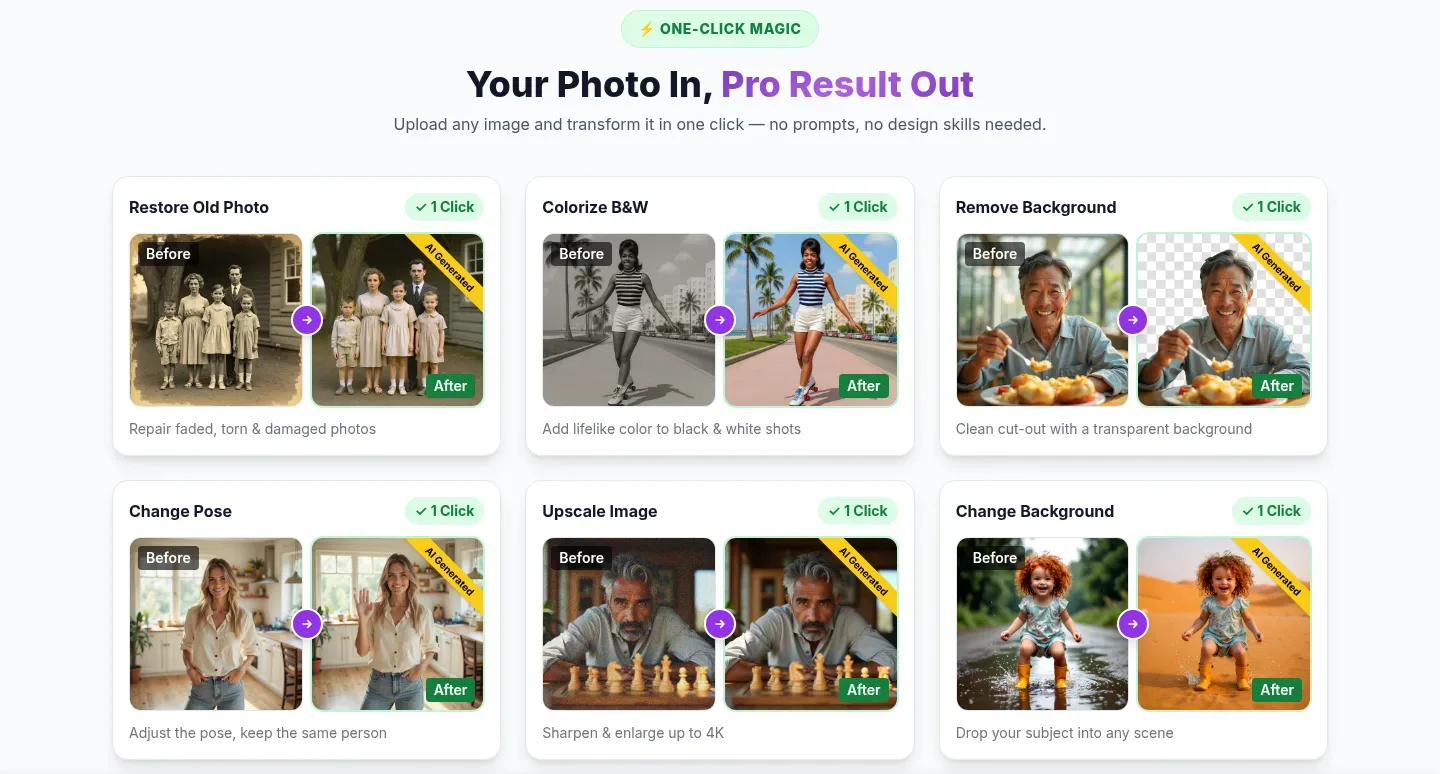
- One-click tools for the jobs this site cares about: Restore Old Photo for faded, torn or damaged prints, Colorize B&W, Sharpen, and an upscaler, according to ArtSpace’s pages.
- Background removal and change background, for a clean product shot.
- Two ways to pay: a one-off lifetime deal, or a monthly plan with a 7-day free trial.
- Commercial use is included on every plan, and its terms say you own the images you make.
- Pro and Unlimited add Canvas Mode, with inpainting and outpainting, consistent characters and output up to 4096 × 4096 pixels.
- ArtSpace names the premium models behind it: FLUX Kontext, Seedream 4.0 and Nano Banana.
- Runs in a browser on a computer, tablet or phone. ArtSpace says there are no visible watermarks on its images.
Where does ArtSpace fall short?
- This page shows no restored family photograph, so judge the result on your own scan before you rely on it.
- It doesn’t make video. You still need an animator or an editor for the moving part.
- No free plan. The monthly plans’ free trial requires a payment method. Under its general policy, subscription charges after the trial are non-refundable. The terms separately describe partial refunds for private customers who cancel after the first term, and preserve applicable statutory withdrawal rights.
- The lifetime deal has a monthly cap: 300 images on Starter and 1,500 on Pro. Starter has no Canvas Mode.
- The lifetime refund is narrow. Request it within 7 days. The terms allow up to 100 generated images, but the lifetime offer says fewer than 100, so stay below 100 if you may request a refund.
- “Lifetime” means the lifetime of the product, for as long as ArtSpace runs.
- ArtSpace requires explicit, documented consent from the person depicted before you upload or edit a photo of someone other than yourself. A restored or colourised face is the AI’s reconstruction, not the original.
- A few older reviews on Trustpilot complain about refunds and logging in.
- Some listed features, such as Storybooks, Power Chat and Character Studio, were marked as coming later, not available yet.
ArtSpace is an AI image tool that runs in a web browser. You can make a picture from a text prompt, but the part that matters for this site is its set of one-click tools: upload a photo, pick a tool, download the result. ArtSpace advertises 311+ one-click tools.
It doesn’t make video. For this site, ArtSpace is a companion tool: the step before the video, when an old print is faded or torn, a scan is too small for a television, or a product photo needs a clean background.
ArtSpace is made by Nico Engler, the same developer as the VoiceWave voice tool. I’ve used his tools since the early days of ClosersCopy, his AI copywriting tool, as one of its early lifetime customers, and I bought ArtSpace’s lifetime deal myself. This page uses the vendor’s public pages and terms captured on 18 November 2026.
Which ArtSpace tools matter for a photo video?
From the lifetime page, checked on 18 November 2026:
- Restore Old Photo: repair faded, torn and damaged photos.
- Colorize B&W: add colour to a black-and-white photograph.
- Upscale Image and Sharpen Pro: enlarge and sharpen a small or soft picture. Pro and Unlimited list output up to 4096 × 4096 pixels.
- Remove Background and Change Background: cut a subject out, or put it in a new scene.
- Change Pose: adjust a person’s pose in a photo.
- Canvas Mode, on Pro and Unlimited: an infinite canvas with inpainting, to change one area, and outpainting, to extend a picture beyond its edges.
- Studios, on Unlimited: Camera Studio reshoots a subject from 8 camera directions and 4 heights, and Pose Studio offers 46 poses.
Some items on the same page were marked as coming later, including Storybooks, Power Chat and Character Studio. I have left them out of the list above.
Where ArtSpace fits
Old family photos for a tribute or anniversary film. ArtSpace requires explicit, documented consent from the person depicted. If you lack that consent for a family photo, use the original scan or make a manual repair before putting it in the film. Where you do have it, use Restore Old Photo or Colorize B&W on the few prints that need it, not all forty, and put each result next to the original. A colourised photo is a guess at the colours, and a restored face is the AI’s reconstruction. Let the family check the finished film. The methods are in the memorial tribute guide and the Christmas film guide.
A small scan that has to fill a television. Upscale it before it goes on the timeline, then check the face at full size.
Before you animate a photo. Compare the prepared photo with the original before using it as a source image in an animator such as Higgsfield or Pollo AI. The rules in how to animate a still photo still apply: if the face changes, delete the take.
A product shot. Remove a messy background so the product sits on a plain one. Don’t use it to change the product, and never change the sky, the view or the rooms in a property photo: in an advert, that is a claim about the property. There is more in the product and property guide.
How do ArtSpace’s plans work?
ArtSpace sells the same three tiers two ways. Prices are in US dollars, plus applicable tax at checkout. These are the figures on 18 November 2026; prices change, so read the price on the checkout screen.
| Plan | Lifetime deal, one payment | Or monthly | Images a month | What else it lists |
|---|---|---|---|---|
| Starter | $59 | $9 | 300 | Relaxed, off-peak queue. No Canvas Mode |
| Pro | $99 | $19 | 1,500 | Priority queue, Canvas Mode, premium models, export up to 4096 × 4096 pixels |
| Unlimited | $169 | $39 | No monthly cap stated | As Pro, plus Studios and a priority+ queue |
The monthly plans start with a 7-day free trial, which requires a payment method, and can be cancelled at any time. The pricing page also offered annual billing. The “See the one-off plans” button at the top of this page goes to the lifetime deal; “See the monthly plans” goes to the monthly plans.
The small print on “lifetime”
- There is still a monthly cap. The lifetime deal is one payment, but Starter gives 300 images a month and Pro 1,500. ArtSpace’s own FAQ says the main difference between the plans is the monthly usage limit.
- “Lifetime” is the product’s lifetime. ArtSpace’s terms say lifetime access refers to the lifetime of the product.
- Refunds on the lifetime deal. Request a lifetime refund within 7 days. The terms allow up to 100 generated images, but the lifetime offer says fewer than 100, so stay below 100 if you may request a refund.
- Refunds on the monthly plans. The monthly plans have the free trial instead. Under its general policy, subscription charges after the trial are non-refundable, though you can cancel to stop future charges. The terms separately describe partial refunds for private customers who cancel after the first term, and preserve applicable statutory withdrawal rights; EU and EEA withdrawals are handled by Paddle, the merchant of record.
- Download as you go. Download a copy you want to keep. The terms do not specify a routine retention period.
Photos of real people
ArtSpace requires explicit, documented consent from the person depicted. Its terms say that for any image of an identifiable person other than yourself, you must have that person’s explicit and documented consent to use their likeness for AI generation and modification, and they have a separate section on what they call likeness-based features: any tool that can change how a real person looks. They also ban using the tools to impersonate or deceive.
If you lack that consent for a family photo, use the original scan or make a manual repair before putting it in the film. Read sections 9 and 10 of the terms yourself before you upload a photograph of someone else. Whatever you use, let close family check the finished tribute.
What reviewers say
ArtSpace has a page on Trustpilot. I haven’t copied a score or a count. A few older reviews there complain about refunds and logging in. Read the refund conditions above before you buy.
About the affiliate link
This page contains affiliate links to ArtSpace: one to the lifetime deal and one to the monthly plans. Both are paid links, and ArtSpace is marked Ad where it first appears on the page. If you buy through one, ArtSpace pays me a commission. You pay the same. I bought my own lifetime deal, and the link didn’t change what I wrote about the monthly cap, the narrow refund or the reviews about refunds. You can also go to artspace.ai directly.
Sources
Checked 18 November 2026:
- ArtSpace lifetime page (one-click tools, plans, image allowances, refund conditions, FAQ; screenshots above)
- ArtSpace pricing page (monthly plans, free trial, yearly toggle; screenshot above)
- ArtSpace’s terms of service (lifetime access, refunds, subscriptions, likeness consent, commercial use, content storage)
- ArtSpace on Trustpilot
Questions people ask
Can ArtSpace turn a photo into a video?
No. ArtSpace makes and edits still images. Use it to get a photo ready, by restoring, colourising, upscaling or cleaning up the background, then animate it with a video tool or put it on a timeline in an editor.
Can ArtSpace restore an old family photo?
Its lifetime page lists a one-click Restore Old Photo tool for faded, torn and damaged photos, and a Colorize B&W tool, on every plan. ArtSpace requires explicit, documented consent from the person depicted, so use it only on photos where you have that consent. Compare the result with the original before you use it.
Is the ArtSpace lifetime deal really a one-off payment?
Yes. On 18 November 2026 the lifetime plans were Starter $59, Pro $99 and Unlimited $169, paid once, in US dollars plus applicable tax at checkout. They still have a monthly allowance: 300 images on Starter, 1,500 on Pro and no monthly cap stated on Unlimited. “Lifetime” means the lifetime of the product, for as long as ArtSpace is operated.
Should I buy the lifetime deal or a monthly plan?
A monthly plan, from $9 a month plus applicable tax on 18 November 2026, lets you try it with a 7-day free trial, which requires a payment method, and cancel. Under its general policy, subscription charges after the trial are non-refundable. The terms separately describe partial refunds for private customers who cancel after the first term, and preserve applicable statutory withdrawal rights. The lifetime deal costs more up front and has no trial. Request a lifetime refund within 7 days; the terms allow up to 100 generated images, but the lifetime offer says fewer than 100, so stay below 100 if you may request a refund. If you only have one box of photos to repair, the monthly plan is the smaller risk.
Can I use ArtSpace images commercially?
ArtSpace says commercial use is included on every plan, and its terms say you own the images you create. The terms don’t allow reselling the service, bulk-generating images “for commercial redistribution as a standalone product”, or using the output to “train, develop, or improve competing” image models or services. Generated images may carry machine-readable provenance information, and the terms prohibit intentionally tampering with it.
Can I edit a photo of someone who has died?
ArtSpace requires explicit, documented consent from the person depicted. If you lack that consent for a family photo, use the original scan or make a manual repair before putting it in the film. Read sections 9 and 10 of its terms before you upload. Whatever you use, let close family check the finished tribute.
Do you own ArtSpace?
Yes. I bought ArtSpace’s lifetime deal myself. I’ve used Nico Engler’s tools since ClosersCopy’s early days, as one of its early lifetime customers.